import matplotlib.pyplot as plt
import numpy as np

x = np.linspace(0, 5, 100)
y = x**3
plt.plot(x, y)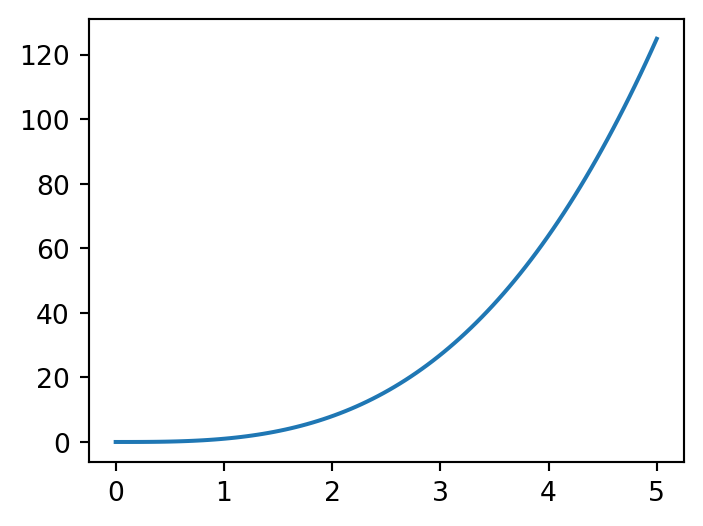
You need to know some basic Python programming to complete the project. This tutorial will teach you these basics. If you are already familiar with Python, you can skip this tutorial and proceed to Tutorial 2.
If you are looking for some additional resources to learn Python, QuantEcon is a great resource for learning programming, with a focus on economics and finance. You can find their Python programming lectures here.
Python is a general purpose programming language, which is free and open source. Open source means that the code is available for anyone to use, modify, and distribute.
Python, when installed, comes with a standard library that includes many modules and functions to perform common tasks. However, we often need to use additional packages to perform more specialized tasks. Some of the most commonly used packages for data analysis and scientific computing include:
For this project, you will use Google Colab, which is a free cloud service that allows you to write and execute Python code in your browser.
You will write and execute your code in Colab notebooks, which are interactive documents that can contain both code and rich text elements (such as paragraphs, equations, figures, links, etc.). Colab notebooks have the file extension .ipynb. If you have used Jupyter notebooks before, note that Colab notebooks are just Jupyter notebooks that are hosted by Colab.
To get started, follow these steps:
File -> New notebook in drive.print('Hello!') in a code cell and run it by clicking the play button or pressing Shift + Enter.Aside: If you want to do some serious programming, you should install Python on your computer, which takes a bit more work. But since the focus of this class is not programming, Google Colab is sufficient for our purposes.
In Python, you can import libraries using the import statement. For example, to import the numpy library and then use sqrt function from it, you can do the following:
However, it is common to import libraries with an alias to make the code more readable. For example, you can import numpy as np, which is a common convention, and then use the sqrt function as follows:
Python has several built-in data types, including integers, floats, booleans, strings, and lists.
You can assign values to variables using the = operator. Python will automatically infer the data type based on the value assigned to the variable.
For instance, you can assign the integer value of 1 to a variable x as follows:
Note that in the above code, we added x at the end, so that when we run the code, Python will print the value of x.
To create a list, we can enclose the elements in square brackets as follows:
Lists can contain elements of different data types. You can access elements of a list using their index. Python uses zero-based indexing, meaning the first element of the list has an index of 0.
Python has a number of built-in functions that are available without import. For example, the print function is used to display output. Some other built-in functions include len, max, min, sum, etc. You can try these out in the code cell below:
We also saw that if built-in functions are not sufficient, we can import libraries and use functions from them (e.g., numpy.sqrt).
However, sometimes we need to define our own functions. We can define a function using the def keyword followed by the function name and the arguments in parentheses. The function body is indented and can contain multiple lines of code. Here is an example of a simple function that returns the square of a number:
Note that in Python, ** is used for exponentiation.
Exercise: Define a function add that takes two arguments x and y and returns their sum. Test the function by calling it with x=3 and y=4.
Now say we defined the function f as follows:
We can call the function f with the arguments x=2, a=3, and b=4 either as f(2, 3, 4) or as f(x=2, a=3, b=4). Both will give the same result. Try it out.
NumPy is a popular Python library for numerical computing. The most important data structure in NumPy is the ndarray, which is a multi-dimensional array. You can create a NumPy array from a Python list using the np.array function. For example:
NumPy arrays are similar to lists but must contain elements that are either all numeric or all boolean. You can perform element-wise operations on NumPy arrays, which is not possible with Python lists. For example, you can square all elements of the NumPy array defined above as follows:
Sometimes it can be useful to create a grid of evenly spaced numbers. You can do this using the np.linspace function, which takes the start, end, and number of points as arguments. For example, to create an array of 5 numbers between 0 and 1:
We will use the matplotlib library to create plots. To do so, we first need to import the pyplot module from matplotlib. Then we can use the plot function to create a simple line plot.
Here is an example of creating a plot of \(y = x^3\) for \(x\) between 0 and 5:
import matplotlib.pyplot as plt
import numpy as np
x = np.linspace(0, 5, 100)
y = x**3
plt.plot(x, y)
Now what if we wanted to add another line for \(z = x^3\) to the same plot? We can do this by calling the plot function again. The code below implements this and also adds a legend and labels to the plot.
plt.plot(x, y, label='y = x^3')
plt.plot(x, x**2, label='z = x^2')
plt.xlabel('x')
plt.ylabel('f(x)')
plt.legend()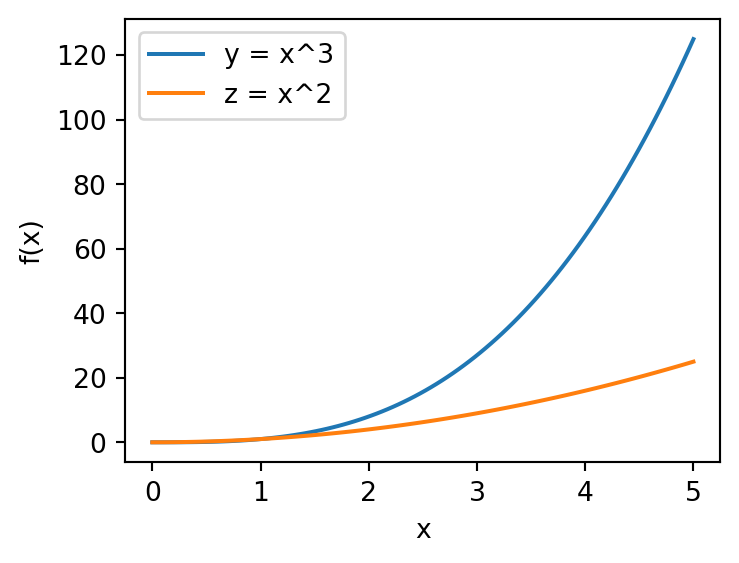
Loops are used to execute a block of code multiple times. Python has two types of loops: for loops and while loops.
A for loop is used to iterate over a sequence (e.g., a list, tuple, string, or range). Here is an example of a for loop that prints the elements of a list:
A while loop is used to execute a block of code as long as a condition is true. Here is an example of a while loop that prints the numbers from 1 to 3:
List comprehensions utilize a for loop to create a new list by applying an operation to each element of an existing list. Here is an example of a list comprehension that squares each element of a list:
Conditional statements are used to perform different actions based on different conditions. Python has if, elif, and else statements for this purpose. Here is an example of an if statement that prints whether a number is positive, negative, or zero:
We can also use Python to solve optimization problems. To do this, we will use the scipy.optimize module from the SciPy library.
Here is an example of solving a simple optimization problem using the minimize function from scipy.optimize. The code below minimizes the function \(f(x) = (x - 2)^2\):
The minimize function takes the function to minimize and an initial guess x0 as arguments. It returns an object that contains information about the optimization result. The optimal value of \(x\) is contained in the x attribute of the result object, which can also be accessed directly by calling result.x. What is the optimal value of \(x\) in this case?
Tutorial 2 will show you how to solve a slightly more complex optimization problem using Python.